


Organization is my lifeline. Nothing causes me more anxiety than being unorganized — except clutter, but that’s a story for another day. Each year I reassess how I plan, organize, and track everything I want to accomplish. I’ve tried countless tools, apps, and tips, always searching for the perfect system.
Despite experimenting widely, I kept returning to Google Calendar and Google Tasks. They’re accessible, mobile‑friendly, and surprisingly flexible. With three businesses, volunteer work, and personal commitments (including exercise and mindfulness), I needed more than a basic calendar. So I set out to transform Google’s tools into my own Digital Planner.
Multiple Calendars, Multiple Colors
The heart of my planner is the ability to create multiple calendars and give each its own color. This lets me visually distinguish between goals, moods, appointments, and chores at a glance.
- Monthly Goals Calendar: In this calendar, I created a recurring all‑day event that starts on the 1st of each month and spans 30 days. The title is “This month’s focus: TBD”, and each month I update the current instance by replacing “TBD” with my key goal, for example, “This month’s focus: Turn the TV off by 10 PM every night.”
- Weekly Goals Calendar: In this calendar, I have a recurring all‑day event that begins every Monday and spans 7 days. The title is “This week’s focus: TBD”, and I update the current instance weekly by replacing TBD with my current week priority, like “This week’s focus: Stretch every morning.”
Because both are set as all‑day events, they appear at the top of my calendar view, making them easy to see every time I look at my planner.


Mood Tracking & Mantras
I added a Mood Tracker Calendar with daily recurring all‑day events. Each event is titled <mood> and includes a list of emotional states in the description field — like Peaceful 😊, Calm 🙂, Neutral 😐, Stressed 😥, and Depressed 😟. Every evening, I open the current day’s event, copy the mood I’m feeling from the list, and replace the placeholder in the title with that emotion. It’s a simple ritual that helps me reflect and stay emotionally focused, and the emojis make it feel light and playful.
I also created a Mantras Calendar for affirmations and inspirational quotes. Whenever I find a phrase that inspires or grounds me, I add it as a recurring event. Some repeat weekly, others monthly, so they stay visible without cluttering the calendar. I love seeing these reflections woven into my day. They remind me to pause, breathe, and return to what matters. Having uplifting reminders show up regularly helps me stay focused on the positive, even when things feel busy or uncertain.


Organizing Daily Life
To keep everyday events clear, I split them into categories:
- Home Appointments (renamed default calendar)
- Away (time blocks for appointments outside the house)
- Chores (household tasks)
Each calendar has its own distinct color, and together they form a soothing palette that makes my planner feel peaceful and inviting. Just looking at it becomes a mindful moment in itself.
Tasks That Support Rituals
Google Tasks became the second pillar of my planner. I created multiple lists to reflect the different areas of my life:
- A general To Dos list for routine personal tasks
- Separate lists for each of my businesses
- Lists for volunteer work, reading, cooking (new recipes), fun, shopping, and home maintenance
- A Life Priorities list and a Wellness Rituals list for deeper goals and practices
The list I use most actively is !Priorities for This Week. This is where I manage my weekly wellness tasks , things like meditation, gratitude journaling, dancing, and exercise. I also move tasks from other lists into this one whenever something becomes time-sensitive or essential for the current week. It’s my way of bringing better visibility to what matters most right now.
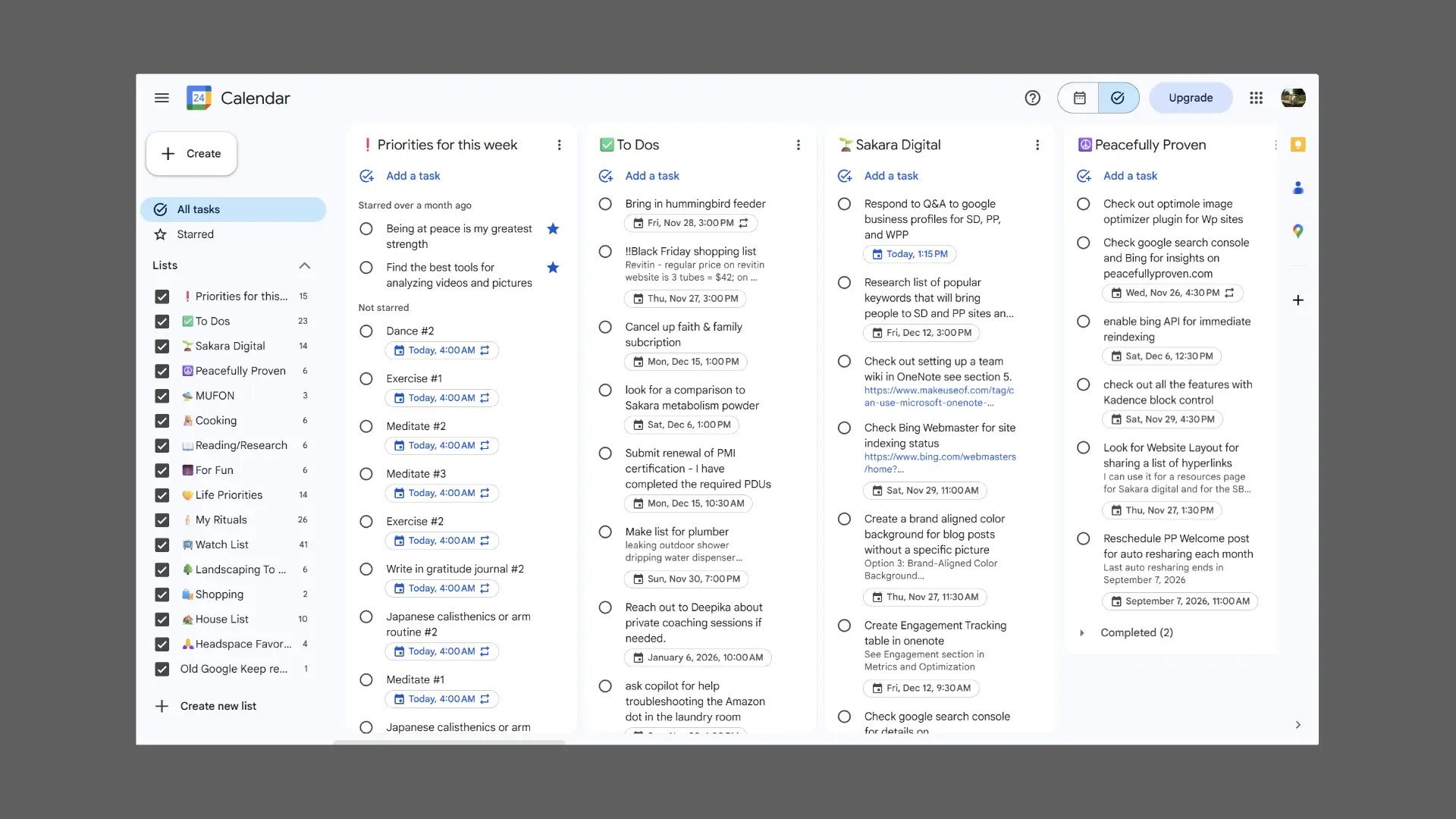
In Google Calendar, I open the Tasks side panel to the !Priorities for This Week list to keep it visible alongside my calendar. I star any items I want to prioritize, whether they’re wellness rituals or urgent tasks, and then sort the list by Recently Starred. This ensures that my most important items rise to the top, making them easy to see and act on throughout the day.
I also star my favorite mantra so it is at the top of this list: “Being at peace is my greatest strength.” It’s a small detail, but seeing it every time I look at my planner helps me stay grounded and intentional.

Rituals That Repeat
My weekly wellness tasks include meditation, gratitude journaling, dancing, and exercise. Each is set up as a recurring task that regenerates every Monday. Whether I complete them or not, a fresh set appears each week, keeping me accountable without guilt.
Closing Reflection
By combining multiple calendars, soothing colors, and structured task lists, I’ve built a planner that’s both functional and calming. But it’s more than just layering features, it’s the creative way I’ve used them. I repurposed standard tools like recurring all-day events to track moods, weekly goals, and monthly intentions, making them easy to update and reflect on. I turned to Google Tasks to manage weekly priorities, starring and sorting them in the side panel for clarity and focus. Nothing here is custom-coded — just thoughtful experimentation with what’s already available. It took time to shape, but now this digital planner helps me manage my commitments while gently reminding me to prioritize peace and wellness.
If you try this setup, or create your own variation, I’d love to hear about it. I’m always inspired by the creative ways others make digital planning feel personal and peaceful.




Join the conversation and add your thoughts.